Document Search+Viewer
Overview
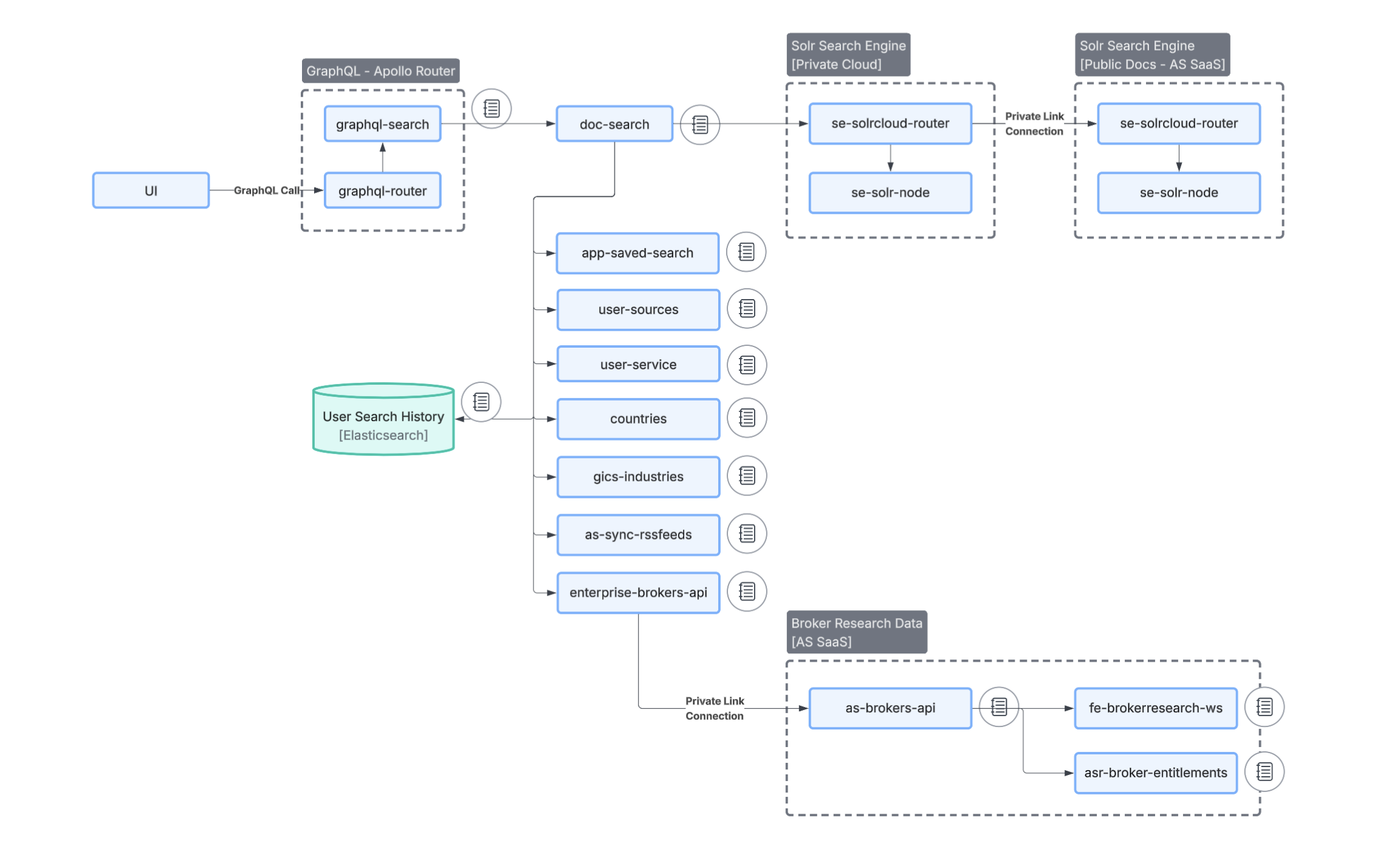
The AlphaSense Enterprise Insight platform serves document search primarily through the doc-search-realtime service, which queries Solr clusters to retrieve candidates and facets, then performs entitlement and enrichment steps before returning results to the client. Once a user selects a result, document content is retrieved through document-data-realtime and the Document Data Service (DDS).
Failures in either the search layer (Solr + doc-search-realtime + filtering) or the content retrieval layer (graphql-document + document-data-realtime + DDS) — or in the shared dependencies they rely on — can result in empty search results, slow queries, or documents that appear in search but fail to load.
Common dependencies involved in incidents include
graphql-search, graphql-document, Solr clusters, asr-broker-entitlements.applications, user-service, user-sources.platform, fe-brokerresearch-ws, query-validator-service, query-facet-score, document-data-realtime
This document serves to outline common failure scenarios related to document search and document loading and provide troubleshooting steps for resolution.
💡 First-level debugging (UI): In the browser network tab, check the latency and response of the
graphql-router?documentSearchcall (search request/response) and thegraphql-documentcall (side panel / open document).Backend: Correlate with logs from
graphql-searchandgraphql-document.
Quick decision tree
- Search is slow
- Start with Solr router latency
- Then check downstream dependency latency (especially per-operation)
- Then check doc-search-realtime resource pressure (CPU throttling, GC, blocked threads)
- Missing documents in results
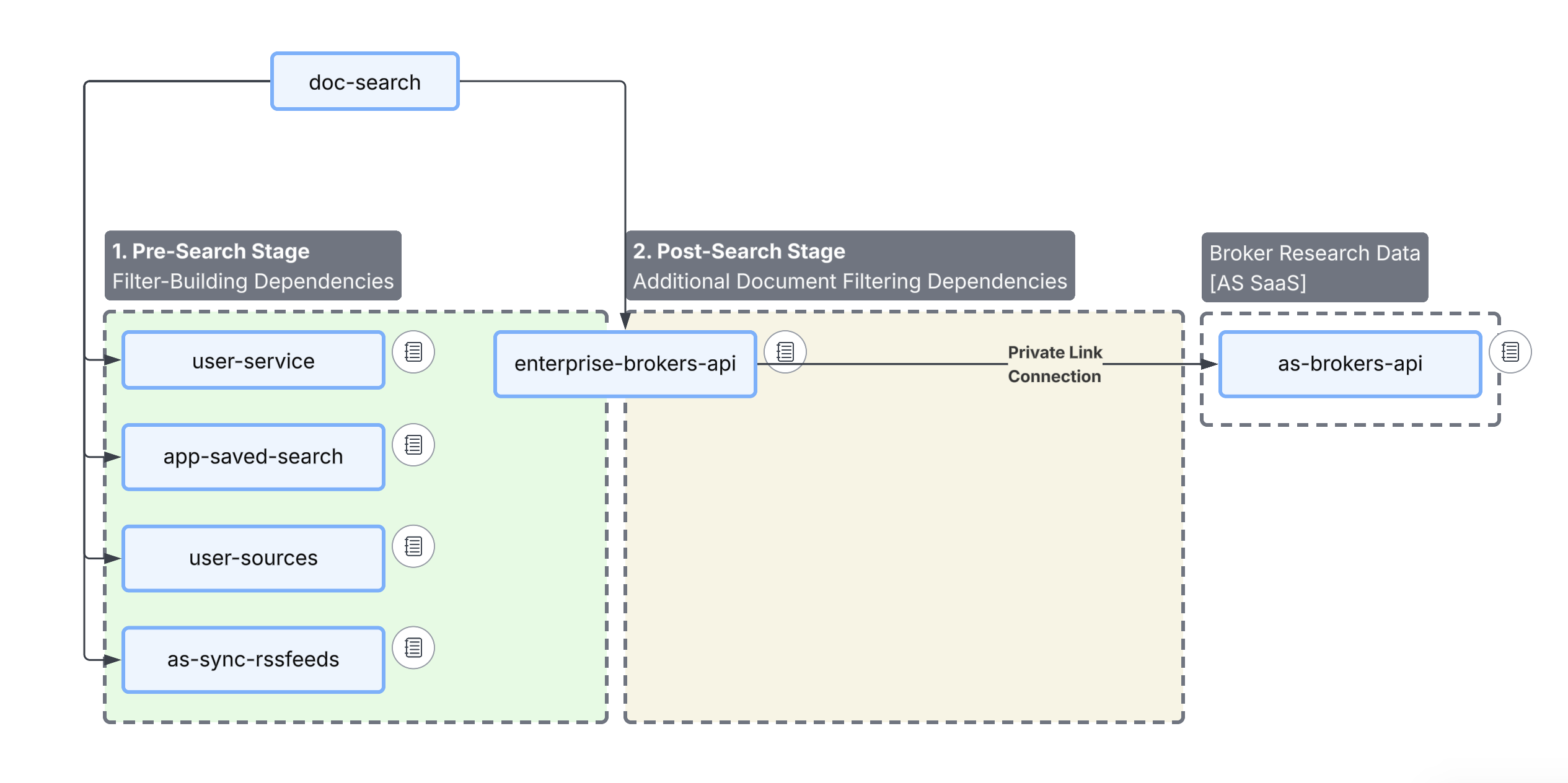
- First determine whether the issue is pre-filtering or post-filtering
- Pre-filtering: filters constructed before the Solr query (license flags, service level, etc.)
- Post-filtering: documents filtered after Solr returns results (DocSearch real-time entitlement checks)
- If pre-filtering looks wrong, focus on filter construction inputs and dependencies (e.g., ABAC or activity storage, user context)
- If post-filtering looks wrong, focus on entitlement services and real-time filtering behavior
- First determine whether the issue is pre-filtering or post-filtering
- Documents are in results but fail to open
- Usually a content retrieval issue (DDS / document-data-realtime / graphql-document)
- Use the graphql-document network response to distinguish Content Not Available vs Entitlement
- If it is confirmed the issue is not entitlement-related, create a support ticket with AlphaSense Support and include the initial data collection from the relevant scenario
Overall Flow
Failure Scenarios
1. High Latency / Slow Search
Triage:
Users report that document search is taking significantly longer than normal or timing out.
This is typically caused by elevated Solr query time, latency in a downstream dependency (check per-operation breakdowns), or internal resource pressure in doc-search-realtime (CPU throttling, JVM GC pauses, or blocked threads).
Troubleshooting:
Start with the highest-signal breakdown, in order:
- Solr router latency
- Downstream dependency latency (especially per-operation)
- doc-search-realtime resource pressure (CPU throttling, GC, blocked threads)
Verify pod health
kubectl get pods -n applications | grep doc-search-realtime
kubectl get deploy/doc-search-realtime -n applications
Look for
-
Pod status like CrashLoopBackOff, OOMKilled
-
Unexpected pod count drops
-
Recent deploys
kubectl get rs -o custom-columns=NAME:.metadata.name,PODS:.spec.replicas,TIME:.metadata.creationTimestamp -n applications | grep doc-search-realtime -
Appconfig changes.
kubectl describe appconfig doc-search--realtime--applications
On Alphasense side
Confirm whether there is a traffic spike compared to baseline (RPS). Then check Solr latency metrics and identify the active search mode (e.g., REGULAR, LYS, SEARCH_API).
Check Dependency latency
If Solr is healthy, check dependency latency metrics for the following services across both overall and per-operation breakdowns:
- enterprise-broker-api
- user-service
- user-sources.platform
- query-validator-service
Check Doc-search resource usage
Check doc-search-realtime logs for JVM memory pressure, blocked thread indicators, or CPU throttling:
kubectl top pod -n applications | grep doc-search-realtime
If doc-search-realtime is saturated, you may need to scale replicas up temporarily or roll a hot pod.
Note: This application is managed by an AppConfig Operator. If you scale the Deployment or patch the Keda ScaledObject directly, the Operator will detect the drift and automatically revert your changes to match the AppConfig source of truth.
To make a change permanent, update the AppConfig instead:
kubectl get appconfig doc-search--realtime--applications -o yaml | yq '(.spec.data[] | select(.kind == "ScaledObject" and .spec.scaleTargetRef.name == "doc-search-realtime")).spec.minReplicaCount = <N>' | kubectl apply -f -
Then, if needed:
kubectl rollout restart deployment/doc-search-realtime -n applications
2. Low Availability / High Error Rate
Triage:
Users experience frequent search errors — 5xx responses, "something went wrong" messages in the UI, or partial result sets.
This is typically caused by downstream dependency errors , thread pool saturation or blocked threads
in doc-search-realtime, or OOMKills causing pod churn.
Troubleshooting:
Check doc-search-realtime pod status for recent restarts and OOM events:
kubectl get pods -n applications | grep doc-search-realtime
kubectl describe pods -n applications -l app=doc-search-realtime | grep -A5 "Last State"
Check logs for thread pool saturation or blocked thread indicators:
kubectl logs -n applications svc/doc-search --tail=200
Identify the top failing dependency hosts in outgoing request metrics, focusing on:
- user-sources(patform)
- enterprise-brokers-api (applications)
In Alphasense focus on
- as-brokers-api
- fe-brokerresearch-ws
- asr-broker-entitlements
If pod churn is occurring, stabilize by scaling up and rolling bad pods.
To make a change permanent, update the AppConfig:
kubectl get appconfig doc-search--realtime--applications -o yaml | yq '(.spec.data[] | select(.kind == "ScaledObject" and .spec.scaleTargetRef.name == "doc-search-realtime")).spec.minReplicaCount = <N>' | kubectl apply -f -
Then, if needed:
kubectl rollout restart deployment/doc-search-realtime -n applications
3. No Results / Missing Expected Documents
Triage:
A user submits a search and receives no results, or documents they expect to see are missing from the result set.
This is typically caused by overly restrictive filters, issues in pre-filtering or post-filtering, or a Solr index and routing mismatch — particularly in Private Cloud environments where public-via-mothership content routing may differ from customer-hosted content.
Troubleshooting:
For Empty results
Reproduce the issue with minimal filters to establish whether UI-level filters are causing the empty result set.
Then determine whether the problem is happening during pre-filtering or post-filtering:
-
Pre-filtering (before Solr query)
- Filters are constructed before the Solr request is sent (license flags, service level filtering, etc.).
- Failures here typically point to filter-construction dependencies (e.g., user context inputs, ABAC or activity storage) or doc-search-realtime itself.
- check logs of user-sources, as-sync-rssfeeds, app-saved-search, user-services
-
Post-filtering (after Solr returns results)
- Post filter occurs only if broker research is included as a source in search.
- Filtering happens after Solr returns relevant documents.
- DocSearch real-time can call entitlement services in real time to remove documents the user cannot access.
- Check logs for enterprise-brokers-api
For document missing in results
If investigating a specific missing document, check whether it is present in the Solr index:
curl "https://<pc-domain>/solr/research/select?q=id:<doc-id>&wt=json"
- If the document is not found in Solr, the issue is with indexing. Coordinate with Alphasense support team to reindex the list of documents.
- If the document is found in Solr but missing from UI results, focus on post-filtering and entitlement services.
Capture the graphql-router?documentSearch request/response from the browser network tab, and check backend logs for the corresponding operations in graphql-search and graphql-document.
4. Documents Not Loading in Side Panel (Content Retrieval Failures)
Triage:
A user can see a document in search results but clicking it fails to load the content in the side panel. Internal or Enterprise Sync documents may also be missing from results entirely despite the user having entitlements.
This is typically caused by failures in the content retrieval path (graphql-document, document-data-realtime, DDS), GraphQL document module performance issues, or a mismatch between what is indexed in Solr and what is stored in the content backend.
Troubleshooting:
First, determine whether this is a Content Not Available problem or an Entitlement problem.
Content Not Available (DDS / content retrieval issue)
-
In the browser network tab, inspect the graphql-document request and response.
- If graphql-document indicates the document does not exist in DDS, the UI will typically show an empty state. This points to a content availability / DDS issue.
-
Confirm whether the document is present in Solr (see Scenario 3).
- If the document is found in Solr but content still cannot be retrieved, the issue is in the
content retrieval layer:
-
document-data-realtime
Check DDS logs for document retrieval attempts, error messages, or timeout issues:
kubectl logs -n platform deployment/document-data-realtime | grep <doc-id> -
graphql-document
Check graphql-document logs for document retrieval attempts, error messages, or timeout issues:
kubectl logs -n applications deployment/graphql-document | grep <doc-id>
-
- If the document is found in Solr but content still cannot be retrieved, the issue is in the
content retrieval layer:
-
If it is confirmed the issue is not related to entitlements, create a support ticket with AlphaSense Support .
Entitlement problem (access denied)
- In the browser network tab, inspect the graphql-document request and response.
- If graphql-document indicates an entitlement denial, follow the "Entitlement - Troubleshooting" runbook.
5. Entitlement Failures Preventing Document Access
Triage:
A user has entitlements to a document but receives a "No documents found" error or cannot open a document. This is typically caused by entitlement check failures, a stale entitlement cache, or the entitlement subsystem being out of sync with Solr.
Troubleshooting:
This issue can be complex to diagnose accurately. Collect the following before escalating: affected user ID, document ID, environment, and timestamp.
Impersonate the affected user and test:
- Can the user see the document in search results?
- Can the user click and load the document?
- Check the browser console for specific error codes
Use the Entitlement Runbook to verify the document and user entitlements.
Dependency hierarchy
- User / UI
- Browser Network calls
graphql-router?documentSearch(search request/response)graphql-document(document open / side panel load)
- Browser Network calls
- Search path (returning results)
- Search indexing + retrieval
- Solr clusters (query + facets)
- DocSearch realtime layer
doc-search-realtime- Pre-filtering inputs (built before Solr query)
- ABAC / activity storage (license flags, user context inputs)
- Post-filtering (entitlement checks after Solr candidates)
asr-broker-entitlements.applications
- Other downstream dependencies
user-serviceuser-sources.platformfe-brokerresearch-wsquery-validator-servicequery-facet-score
- Pre-filtering inputs (built before Solr query)
- Search indexing + retrieval
- Content retrieval path (opening a document)
- Metadata + document payload to the client
graphql-documentdocument-data-realtime- DDS (Document Data Service)
- Metadata + document payload to the client